



Everyday Tech Confidence with the 2026 Chevrolet Trax for Boerne, TX Drivers
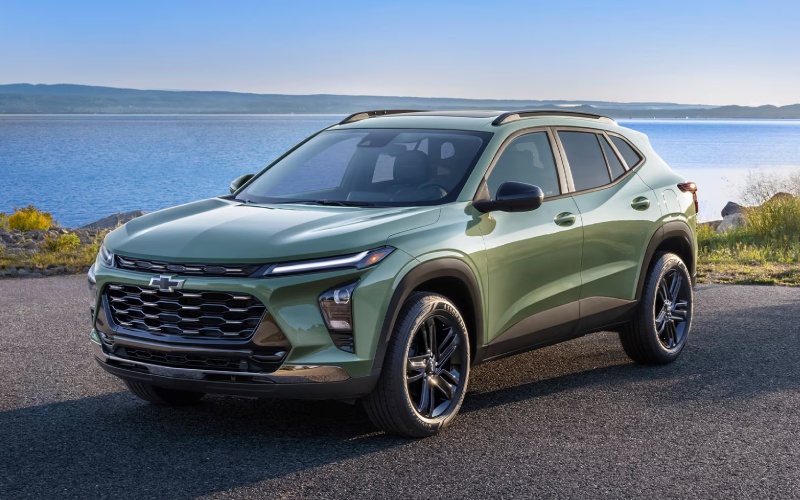
Ancira Winton Chevrolet – Everyday Tech Confidence with the 2026 Chevrolet Trax for Boerne, TX Drivers
The 2026 Chevrolet Trax blends smart features and approachable design in a way that fits real life—especially if you spend your week rotating between city errands, school pickups, and spontaneous weekend drives around Boerne, TX. This small SUV takes the stress out of staying connected with standard wireless Apple CarPlay® and wireless Android Auto™, while an available 11-inch center HD touch-screen places your maps, media, and menus in large, easy-to-read format. Add available wireless charging and a built-in Wi-Fi® hotspot and your crew’s devices stay powered for the long haul without cable chaos. Technology here isn’t about more for the sake of more—it’s about tools that feel natural and helpful from day one.
Confidence is also baked in. Chevy Safety Assist™ is standard, and its features are designed to help you avoid or reduce the severity of certain collisions through meaningful, well-timed support. From alerts that promote awareness to automatic braking in specific situations, the Trax leverages sensors and cameras to add an extra layer of assurance on busy streets. IntelliBeam® High Beam Assist is equally practical on dimmer backroads, automatically toggling your high beams to help you see without causing glare for others. Put simply, the Trax’s tech works with you, not against you.
- Wireless Apple CarPlay® and Android Auto™: Connect your smartphone without cords for calls, messages, maps, and playlists that appear right on the infotainment screen.
- 11-inch Center HD Touch-Screen: Available large-format display gives you crisp visuals and simple menus so you can glance, tap, and go.
- Wireless Charging: Available pad helps keep your phone powered while you drive—no adapters required.
- Built-in Wi-Fi® Hotspot: Available connectivity supports streaming, conferencing, and navigation updates on the move.
- Chevy Safety Assist™: Standard suite includes Forward Collision Alert, Automatic Emergency Braking, Front Pedestrian Braking, Lane Keep Assist with Lane Departure Warning, Following Distance Indicator, and IntelliBeam® High Beam Assist.
For many drivers, the most common question is whether this technology complicates daily life. In the Trax, the opposite tends to be true. Wireless smartphone integration eliminates the biggest pain points—cables and extra steps—while large, clear system graphics help the driver keep eyes forward and hands lightly on the controls. Voice prompts are responsive and natural-sounding, which means quick route changes or finding coffee on the way home happens without digging through submenus. The result is a tech-forward cabin that feels welcoming, not overwhelming.
If you prefer a quick-start plan for getting the most out of your first week with the Trax, here’s a simple approach that keeps things stress-free.
- Pair your phone once: Use the on-screen prompts for wireless Apple CarPlay® or Android Auto™ and confirm permissions for messages and maps.
- Set your core home screens: Arrange common tiles—nav, audio, phone—so they’re reachable with minimal taps.
- Customize Safety Assist alerts: Adjust alert sensitivity and follow-distance preferences to match your comfort level.
- Enable cloud extras: Turn on the available Wi-Fi® hotspot and confirm automatic updates for traffic and navigation.
That’s really all it takes to feel at home. Because the Trax’s systems are designed around everyday tasks, you spend less time learning and more time enjoying the drive. If you want a guided walkthrough, many owners find that a 15-minute orientation covering smartphone pairing, display customization, and Safety Assist settings is the perfect way to start.
Frequently Asked Questions:
Is wireless Apple CarPlay® and Android Auto™ standard on the 2026 Chevrolet Trax?
Yes. Wireless Apple CarPlay® and wireless Android Auto™ are standard, so you can leave your cables in the console.
Do I need to order the larger display to get the best tech features?
The available 11-inch center HD touch-screen adds extra visual space, but core features including wireless smartphone compatibility are standard across the lineup.
What safety features are included in Chevy Safety Assist™?
The suite includes Forward Collision Alert, Automatic Emergency Braking, Front Pedestrian Braking, Lane Keep Assist with Lane Departure Warning, Following Distance Indicator, and IntelliBeam® High Beam Assist.
Will the Trax’s technology work well for families?
Absolutely. Easy device pairing, the available Wi-Fi® hotspot, and straightforward menus make daily routines smoother for drivers and passengers alike.
When you’re ready to see how these features fit your routine, a short test drive with a product specialist can highlight the details that matter most to you. Ancira Winton Chevrolet — serving Selma, Boerne, and Castroville— offers hands-on walkthroughs that cover pairing, personalization, and safety settings so you can drive away confident and connected. The 2026 Chevrolet Trax keeps tech simple, helpful, and always ready—just like you need it to be.
0 comment(s) so far on Everyday Tech Confidence with the 2026 Chevrolet Trax for Boerne, TX Drivers